


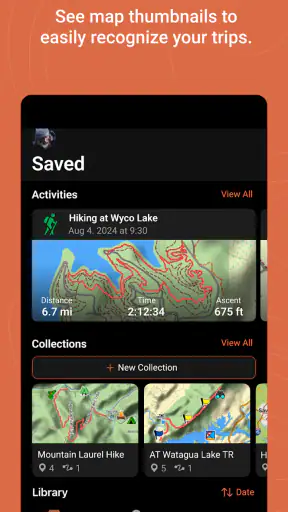
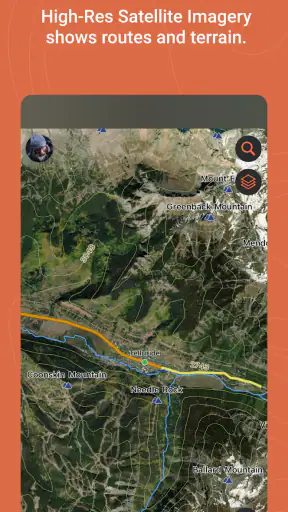
I look at Garmin Explore as a planning and companion app for people who already use compatible Garmin equipment, rather than as a general replacement for every navigation app on a phone. It sits in the Maps & Navigation category, comes from Garmin, and is free to install. That combination makes the first decision fairly simple: there is no purchase price to weigh against the basic experience. The more important question is whether you own, or intend to use, compatible Garmin hardware that can make the app worthwhile.
In my experience, that distinction matters immediately. A free navigation app can still be a poor value if it does not fit the way you travel. Garmin Explore is most interesting when a trip involves preparation, saved places, routes, and a Garmin device working alongside the phone. If all I need is a quick address search and turn-by-turn directions for an ordinary drive, I would normally choose a conventional everyday maps app instead.
How Garmin Explore fits into a real trip
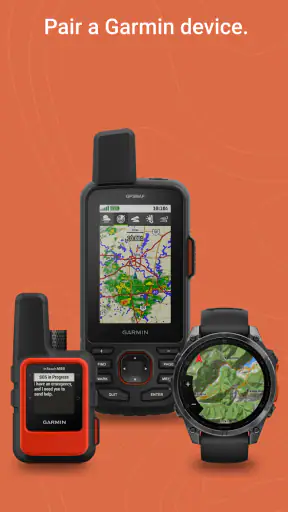
The app’s role is best understood as a bridge between planning on a mobile screen and using a compatible Garmin device away from the desk. The store describes it as a complete mobile trip-planning solution for compatible Garmin devices, and that wording sets the right expectation: compatibility is central, not a minor extra. I would not install it blindly and assume that any Garmin product will automatically provide the same experience.
That makes the first practical step easy but important. Before building a detailed trip, I would check that my particular Garmin device is supported and that the functions I care about work with it. This avoids a frustrating situation where I spend time arranging a route in the app only to discover that my hardware cannot use that part of the plan in the way I expected.
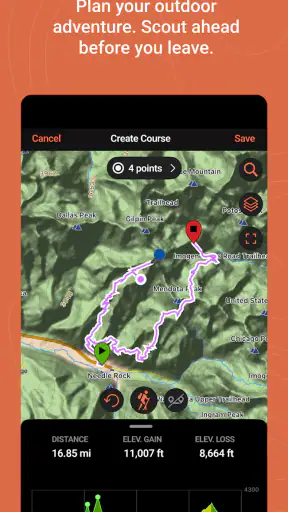
For a weekend away, I can imagine using the phone at home to assemble the trip, mark useful locations, and keep the overall plan in one place. The value is not just drawing a line on a map. It is having a prepared reference that can accompany a compatible Garmin setup, instead of trying to recreate the same plan while standing beside a trailhead, campsite, or unfamiliar road.
That preparation-first approach separates Garmin Explore from the usual phone-map habit. Standard map apps are excellent when I want an immediate destination, nearby businesses, traffic information, or a familiar route generated on demand. Garmin Explore appeals more when I already know that the journey needs organization and when the Garmin device is part of my navigation routine.
The free price is useful, but the hardware context decides the value
Garmin Explore is listed as free, so I can try the app without paying for access to the app itself. That is a meaningful advantage for existing Garmin owners: there is no app purchase to add to the cost of a trip, and I can judge the workflow before relying on it. It also makes the app easier to recommend as a planning companion when the compatible device is already in my kit.
Free access should not be confused with a universal, standalone navigation solution. The app’s usefulness depends on the Garmin equipment it is designed to accompany, and that hardware is a separate consideration. I would therefore judge the total value in two layers: the app costs nothing to install, while the practical benefit depends on whether my current setup is compatible and useful for my travel style.
This is a better way to think about the price than calling it simply a bargain. Someone who already owns suitable Garmin gear may get a lot from the no-cost companion experience. Someone without that equipment may find that a free phone map app delivers more immediate value because it works independently and is already designed around everyday smartphone navigation.
The app has an Everyone content rating, which suits its broad travel-planning purpose. It is also available for a wide range of devices beginning with operating system version 9, so compatibility is not limited to only the newest phones. Still, operating-system support and Garmin-device compatibility are different checks. I would verify both before making the app part of a serious trip plan.
What I would use it for before leaving home
My preferred use would be preparing a trip when I have several stops and do not want the journey to exist only as a collection of temporary searches. I could think through the route calmly, organize the places that matter, and then use the resulting plan with my compatible Garmin device. That is more deliberate than opening a map app at each turn and hoping the next search produces the right result.
A realistic example would be a day that combines a meeting in an unfamiliar town, a fuel stop, a scenic detour, and a final destination outside the main center. With an ordinary map app, I might search each place separately and lose track of the order. With Garmin Explore, I would prepare the sequence in advance and keep the trip’s structure visible. The advantage is not flashy; it is the reduction of small decisions while I am already traveling.
For outdoor-oriented trips, planning ahead can be even more useful. A phone is a convenient planning screen, but it is not always the device I want to handle repeatedly while moving. If my compatible Garmin unit is better suited to the journey, the app gives me a way to do the organizational work on the phone and then take advantage of the dedicated device.
One practical tip is to treat the app as a planning workspace rather than a last-minute rescue tool. I would prepare the important parts while I have time, review the route before departure, and make sure the Garmin device has received what it needs. That workflow reduces the risk of discovering a connection or compatibility problem only after the trip has started.
Where the experience differs from ordinary map apps
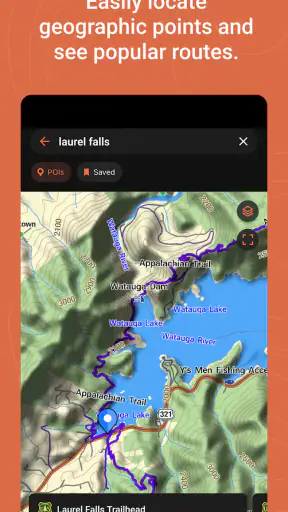
Most people already know how a mainstream map app behaves: type a destination, compare suggested routes, and follow the directions. Garmin Explore has a narrower but more purposeful identity. Its strength is the relationship between mobile trip planning and compatible Garmin navigation hardware, not necessarily the broadest directory of businesses or the fastest answer to a casual location search.
I would choose a regular maps app for spontaneous errands, public-place searches, traffic-led commuting, or checking what is open nearby. Those apps are usually built around immediate discovery and everyday convenience. I would choose Garmin Explore when the trip is something I want to prepare, preserve, and use as part of a Garmin-centered setup.
That trade-off is easy to miss because both types of apps display maps. The important difference is the workflow around the map. One begins with a destination and generates an answer. The other is more attractive when I begin with a planned journey and want that plan to work alongside compatible Garmin equipment.
This also affects how I would recommend it to a friend. I would not say, “Install this because it is a better map for everyone.” I would say, “Install it if your Garmin device is part of how you travel and you want a mobile place to prepare trips.” That is a narrower recommendation, but it is much more honest and useful.
Small workflow choices that make a difference
The first non-obvious lesson is to separate planning from navigation. I would do the careful work on the phone before leaving, then use the Garmin device for the part of the journey where a dedicated screen or device is more convenient. This division prevents the phone from becoming the only source of information and makes the app’s purpose clearer.
The second is to plan around the trip rather than around isolated destinations. Instead of repeatedly searching as I go, I would identify the stops that define the day and arrange them before departure. This is especially helpful when the route includes a detour or a destination that is not the obvious endpoint. The app becomes more valuable as the journey becomes more structured.
The third is to test the complete chain before relying on it. I would open the app, confirm the compatible Garmin device is recognized, prepare a small sample plan, and check how that plan appears on the device. That rehearsal is more useful than simply confirming that the app launches. It tests the part that matters: whether the phone-to-device workflow matches my expectations.
A fourth consideration is keeping a simple backup mindset. Even when a planned route looks correct, travel conditions can change, and no single app should be treated as a guarantee. I would keep the essential destination details available in another practical form and avoid making an unfamiliar trip depend on an untested setup. This is not a criticism unique to Garmin Explore; it is sensible preparation for any navigation tool.
Limitations I noticed in the choice itself
The biggest limitation is the app’s dependence on compatible Garmin hardware. That is not necessarily a flaw, because the app is designed around that relationship, but it narrows the audience. If I only have a phone and want a complete navigation experience without another device, Garmin Explore would not be my first recommendation.
There is also a learning curve compared with opening a familiar map app and entering an address. The planning-centered approach asks me to think about the trip before using it. That extra structure is valuable for organized journeys, but it can feel unnecessary when I am simply driving across town or looking for a nearby café.
Another trade-off is that the best value may not be visible during a five-minute test. The app makes more sense when I have a real route to prepare and a compatible Garmin device to use. A quick launch with no trip and no connected hardware may leave me wondering what the app adds. I would evaluate it through a complete travel scenario, not just by browsing the opening screen.
I would also avoid assuming that the word “complete” means it replaces every other navigation tool. In practical use, I see it as complete within its intended Garmin trip-planning role. For live local discovery, broad place information, or a quick commute, another map app may remain more convenient. Choosing the right tool depends on whether the journey is planned around Garmin equipment or around the phone alone.
Who gets the most value from it?
Existing Garmin users are the clearest audience. If I already own a compatible device and want to prepare trips from a phone, the free app is easy to justify. It can make the Garmin setup feel more connected and reduce the need to improvise routes or stops at the moment I need them.
It also suits people who enjoy preparing journeys in advance. Road-trip planners, travelers with several stops, and users who prefer a dedicated Garmin device may appreciate the organized workflow. The app is particularly sensible when the trip matters enough that I want to review the route before leaving rather than depend entirely on live searching.
Someone who regularly moves between phone planning and Garmin navigation can benefit from the app’s companion role. The phone is comfortable for arranging details, while the compatible Garmin device can remain the travel-focused part of the setup. That division can be more comfortable than trying to manage every navigation task on a phone.
On the other hand, I would tell casual commuters and occasional address seekers to look elsewhere first. If the main need is traffic-aware routing, quick business searches, or spontaneous directions, a mainstream map app is likely to feel faster and more natural. The same applies to anyone who does not own compatible Garmin equipment and does not want to build a navigation setup around it.
It is also not the best match for a person who dislikes pre-trip preparation. Garmin Explore rewards users who are willing to organize a journey, check compatibility, and think through how the plan will be used. If I want the app to make every decision for me at the last second, its more deliberate approach may feel like work rather than help.
Current scale and what that suggests
The app has passed one million installs, with an average rating of 3.5 from about five thousand five hundred ratings and four hundred thirty-two reviews. I read that as a sign of a recognizable but specialized tool rather than a universally loved everyday map. The rating does not make the decision on its own, but it supports the idea that the experience can depend heavily on the user’s Garmin device and expectations.
Garmin has continued the app through version 4.15, and its release date is October 11, 2018. Those details place it in an established product line rather than a brand-new experiment. For me, the more relevant point is still whether the current version works well with my exact hardware and preferred travel routine.
I would install it on a supported phone running at least operating system version 9, then test a modest route before trusting it with a major journey. That approach costs nothing at the app level and gives me a practical answer faster than relying on the rating alone. If the planning and device workflow feels natural, the free price becomes a genuine benefit.
My buy-or-skip verdict
My recommendation is conditional but positive for the right Garmin owner. Because the app is free, there is little financial risk in trying it, and it can deliver real value when a compatible Garmin device is already part of the trip. I like the preparation-first approach, especially for journeys with multiple stops or for situations where I want the phone and dedicated Garmin hardware to share the workload.
I would skip it as my main navigation app if I only need ordinary phone directions, local search, or spontaneous routing. In that situation, the Garmin connection adds a layer I may not use, while a general maps app is likely to be more direct. I would also postpone relying on it until I had confirmed compatibility and tested a complete phone-to-device workflow.
For a friend who owns suitable Garmin equipment, I would say: install it, prepare a real short trip, and judge it by how much easier that trip becomes. For a friend without Garmin hardware, I would point toward a standalone maps solution instead. The free price is the easy part; the real value comes from fitting Garmin Explore into the right navigation setup.


